Touki BlockchainTOUKI Network Chain ID 2105
← Back to the community challenge
Official illustrated guide

Join your group. Buy TOUKI. Return anytime.

Follow these steps from MetaMask connection through confirmed delivery. Your wallet is your account—there is no separate Touki username or website password.

01
Official page

Open the challenge and connect your wallet.

  1. Go only to blocktouki.com/challenge.
  2. Review the public progress, leaderboard, and rules.
  3. Connect the MetaMask wallet you want to use permanently.
  4. Create or join a group to unlock the challenge packs.

Packs and payment options stay hidden until the connected wallet has signed permanent group membership.
02
Permanent group

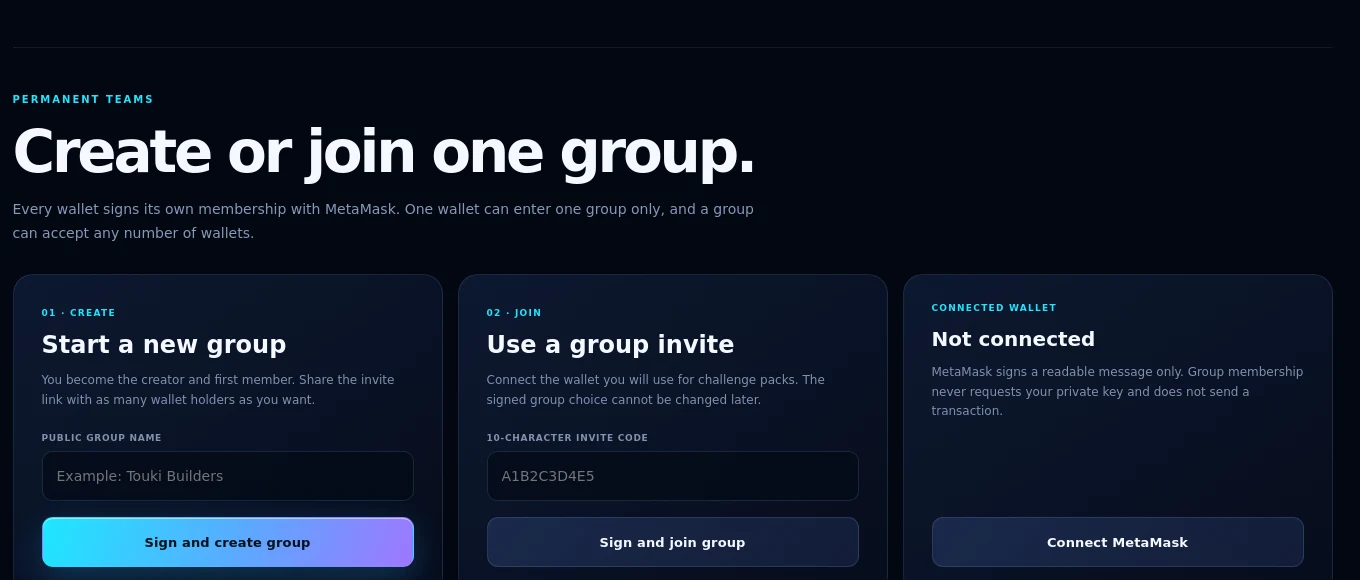
Connect MetaMask, then create or join one group.

Join an existing group

  1. Open the private invite link sent by the group creator.
  2. If needed, paste the 10-character invite code into the join field.
  3. Click Connect MetaMask.
  4. Verify that the displayed wallet address is correct.
  5. Click Sign and join group.

Create your own group

  1. Enter a public group name.
  2. Click Sign and create group.
  3. Click Sign to reveal private invite.
  4. Copy and share the invite with any number of wallets.
One wallet can belong to one group only. Membership cannot be moved later, and every invited wallet must sign its own membership.
The live Touki challenge create group, join group, and MetaMask cards
Use the creator card, invite-code card, or MetaMask connection card shown on the live page.
03
Wallet approval

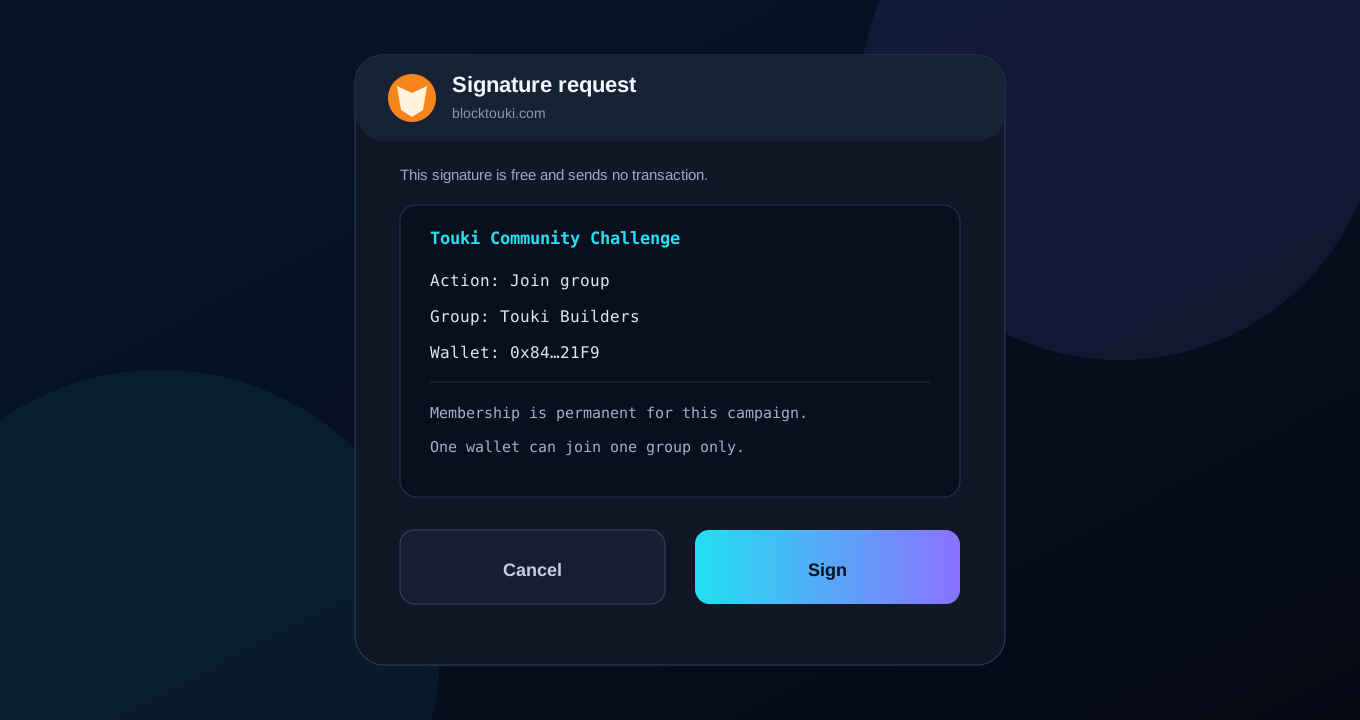
Read and sign the membership message.

  1. MetaMask opens a readable signature request.
  2. Confirm the action, group, and wallet address.
  3. Click Sign if every detail is correct.

This membership signature is not a blockchain payment and does not require gas. Never share your seed phrase, private key, or wallet password with Touki, a group creator, or support.

Illustration of the readable MetaMask group membership signature
Illustration: MetaMask wording can vary by version, but always review the domain, wallet, and message before signing.
04
Checkout

Select a pack and payment asset.

  1. Confirm that your permanent group is shown.
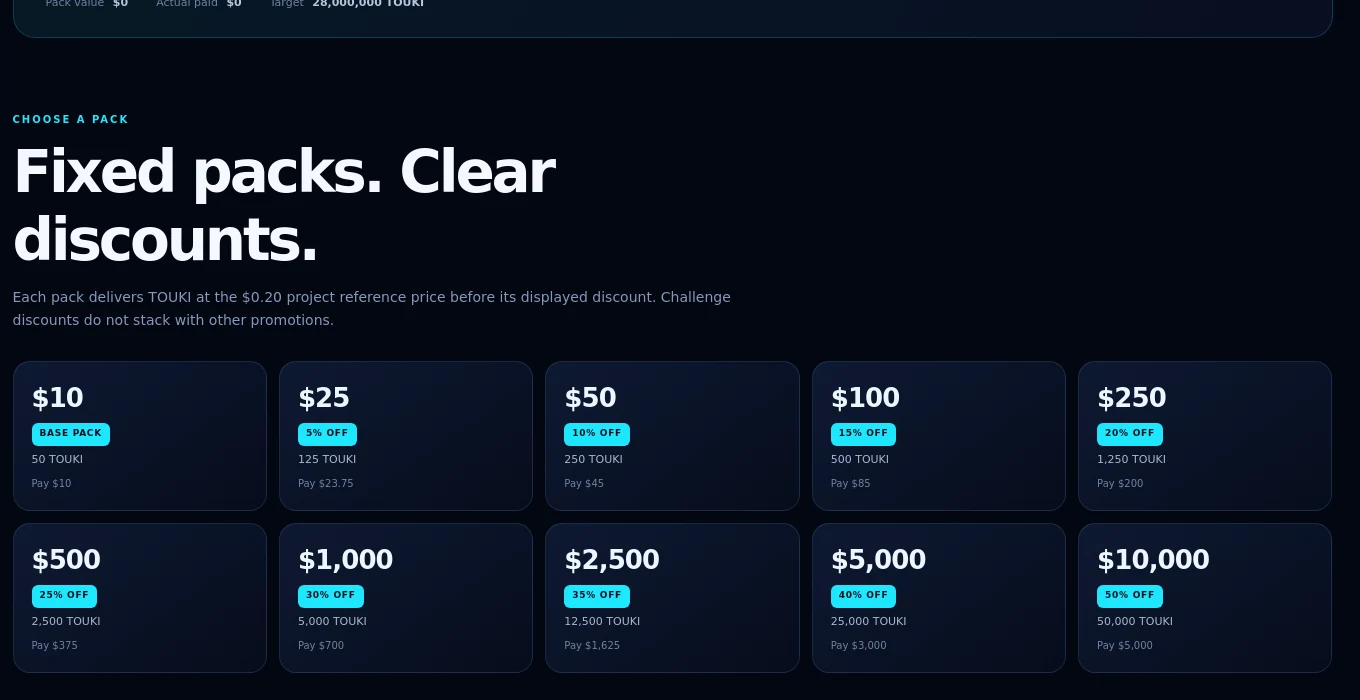
  2. Select one fixed pack from the pack grid.
  3. Choose MetaMask or Exchange / manual payment.
  4. Choose USDT, BNB, or Binance-Peg ETH.
  5. Click Pay with MetaMask or Continue to manual payment.

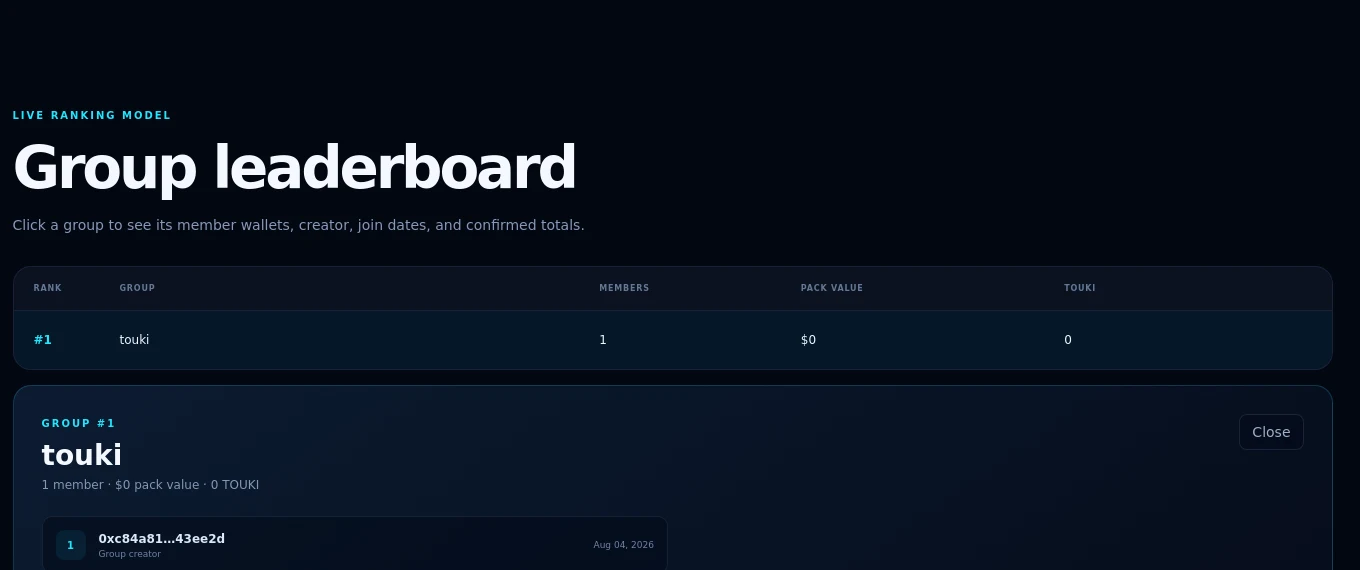
The live leaderboard lets you inspect group members and confirmed totals. Only fulfilled pack orders count toward those totals.

The Touki challenge fixed pack grid shown after group membership
The pack grid appears only after the connected wallet creates or joins a group.
The live Touki challenge group leaderboard and member details
Click a leaderboard group to inspect its member wallets and confirmed TOUKI totals.
05
BNB Smart Chain

Send the exact asset and exact amount.

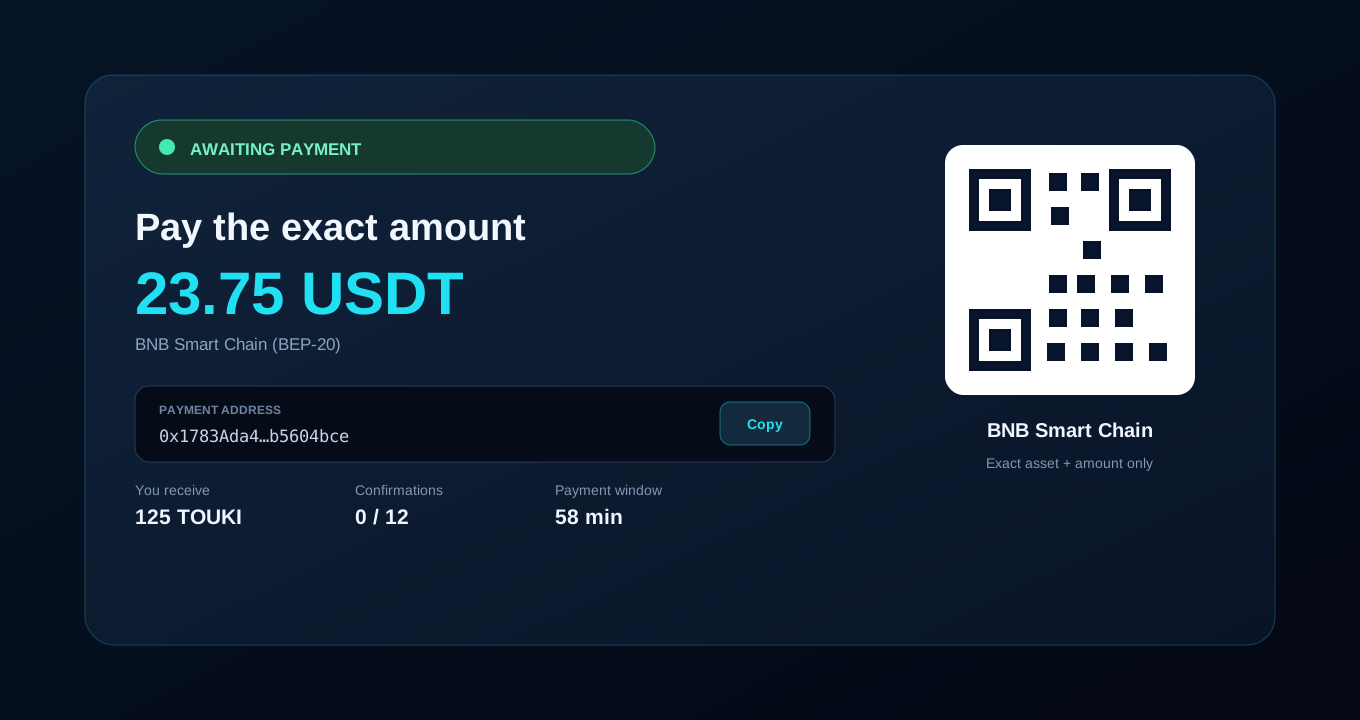
  1. Read the exact amount, selected asset, network, payment address, TOUKI amount, confirmation requirement, and timer.
  2. For MetaMask, review and confirm the exact BNB or BEP-20 transaction opened by the site.
  3. For Exchange / manual, copy the payment address and exact amount or scan the QR code.
  4. Send only the selected asset on BNB Smart Chain before the payment window expires.
  5. Copy and keep the order ID for support or a new device.
Do not use Ethereum, Tron, Solana, or another network. Do not send a different token or amount. A sent transaction is not yet a confirmed TOUKI delivery.
Illustration of the exact Touki challenge payment instructions
Illustration using the $25 pack example: 125 TOUKI for exactly 23.75 USDT on BNB Smart Chain.
06
Automatic tracking

Wait for confirmation and TOUKI delivery.

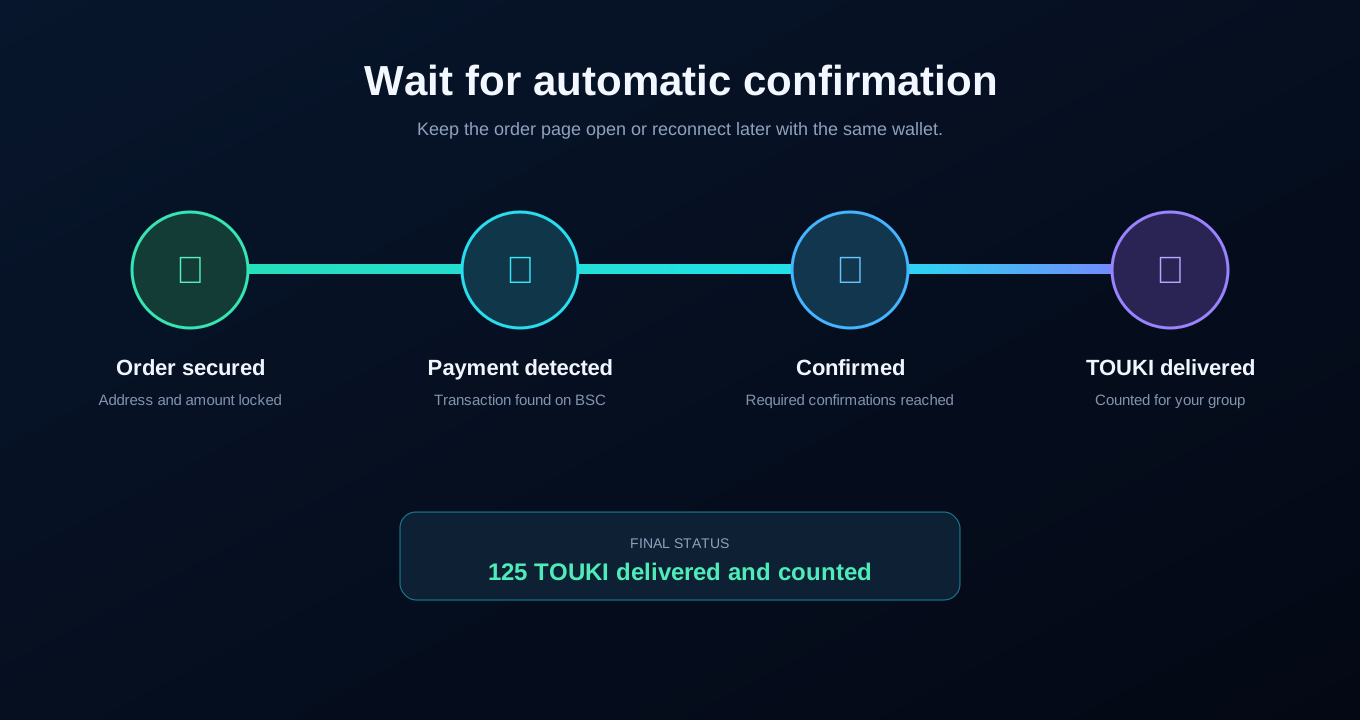
  1. The order begins as Awaiting payment.
  2. The page checks BNB Smart Chain automatically.
  3. You may paste the optional BSC transaction hash and click Verify.
  4. Wait for all required confirmations.
  5. When fulfilled, click View TOUKI delivery to open the ToukiScan transaction.

Only fulfilled orders are added to confirmed group totals. A late or unfulfillable payment can require refund review through support.

Illustration of secured, detected, confirmed, and delivered order stages
Completion means the interface displays a fulfilled delivery and provides its ToukiScan link.
07
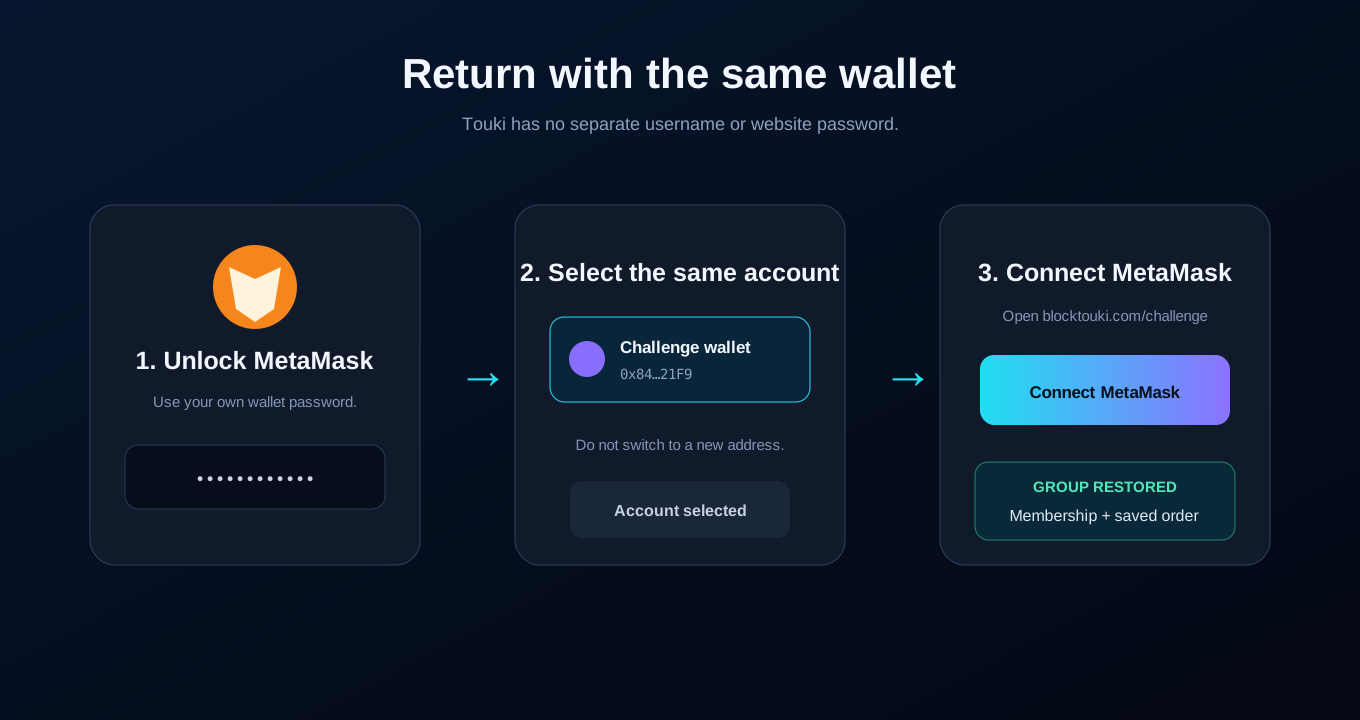
Login again

Reconnect later with the same MetaMask wallet.

  1. Reopen blocktouki.com/challenge.
  2. Unlock MetaMask on your device.
  3. Select the same wallet account used to join the group.
  4. Click Connect MetaMask.
  5. The site reloads your group and restores the last saved order on the same browser.

If the wrong address appears, switch accounts inside MetaMask and reconnect. The page clears the previous wallet's private invite and order view before loading the selected account.

On a different browser or device, keep your order ID and contact Touki support if you need the order restored. Never send support your private key or recovery phrase.
Illustration of unlocking MetaMask, choosing the same wallet, and reconnecting
Your wallet address is the identity. There is no separate website password to remember.
Need help?

Keep your wallet secure.

Touki support can review an order ID or public transaction hash. Support will never need your seed phrase, private key, or wallet password.

Contact support